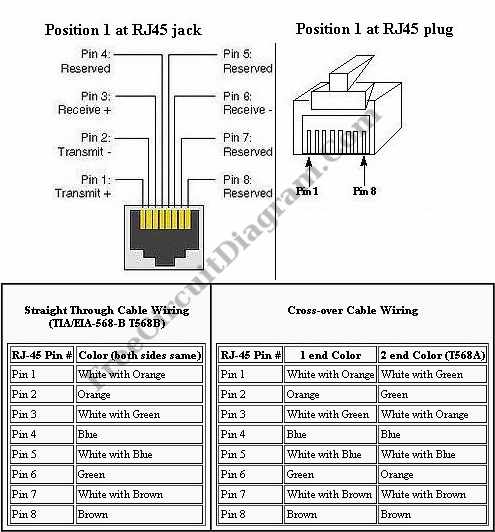
RJ45 is used to connect Ethernet port on your computer. There are two configuration: straight and cross. Straight RJ45 cables should be used to connect between computer and device such as switch or hub, and cross RJ45 cables should be used in computer-to-computer connection. Some hub or switch has the capability to detect the cable type and accept both straight and cross RJ45 cables. Here is the RJ45 pin and wiring diagram:

A straight Ethernet cable has same RJ-45 pin-out configuration at both end of the CAT-5 cable, either by using EIA/TIA-568A standard or EIA/TIA-568B standard.
Possibly Related Articles:
- RS232 (COM) Port Pinout Diagram
This pin diagram will be useful when viewing these connectors. Sometimes you hold a soldering iron to the back of the connector, and you don’t remember the numbering of the... - RJ45 – Video Tutorial
This is a video tutorial about RJ45. This video shows how to punch down an RJ45 keystone jack using a impact tool. The first thing that we gonna do is... - PC (Audio) Signal Generator Using RS232 Port
Using an RS232 port, we can generate square wave oscillation when transmitting data, and this can be “misused” as signal generator (square wave generator). This is a PC Signal generator...
| 

